Configure webhooks
Configure webhooks
Overview
Walnut webhooks let you send structured session data to another system automatically whenever a tracked event occurs.
Instead of polling Walnut for updates, your configured endpoint receives an HTTP POST request when a supported event is ready. This makes it easier to trigger automations, enrich records in external systems, and move Walnut engagement data into your analytics stack in near real time.
Before You Start
Before setting up webhooks, make sure you have the right access and understand when Walnut sends session events.
Configure Webhooks
Walnut makes it easy to create a webhook, add signature verification, and send a test event before going live.
How to Configure and Test a Webhook
-
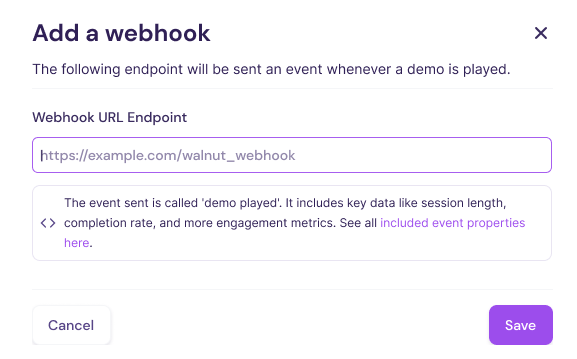
Navigate to Settings > Webhooks and click New webhook.
-
Enter your webhook endpoint URL and click Save.
-
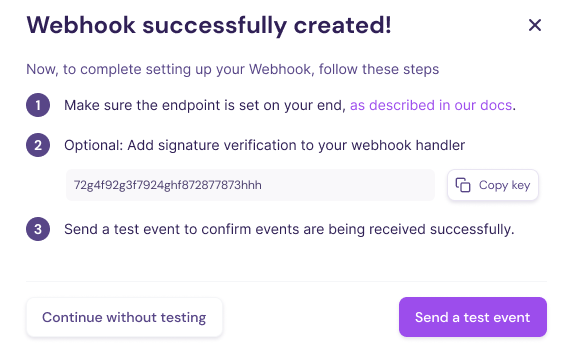
Optionally add signature verification so your endpoint can confirm requests came from Walnut.
-
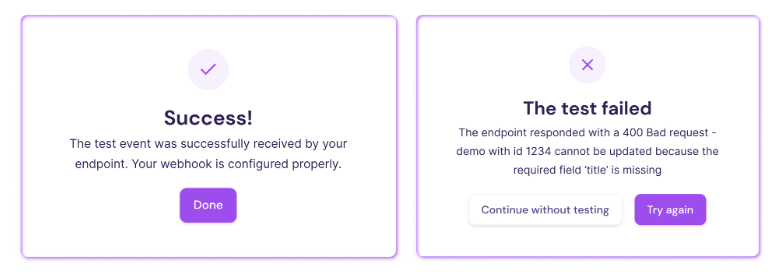
Click Send a test event to validate the connection.
Walnut Engagement Data at a Glance
In addition to built-in Walnut Insights, Walnut can send structured session data through webhooks so you can use it in external systems and custom workflows.
These webhook payloads can help you:
- Analyze engagement behavior and drop-off points
- Trigger automations in CRM, MAP, or internal systems
- Enrich contact, account, or opportunity records
- Power custom dashboards and downstream reporting
Use these JSON objects when building webhook handlers, integrations, enrichment flows, or custom reporting pipelines.
Demo Session Object
The demo session webhook object captures engagement with a single Walnut demo.
Walnut sends this object with the demo_session_finished event once the session data and calculated metrics are available.
Demo Session Data Points
| Key | Description | Example Value | Data Type |
|---|---|---|---|
demo.id | Unique identifier for the demo instance. | 7a8e73ec-93ef-4f35-aadf-33c2ada9b887 | string (UUID) |
demo.name | Name of the demo. | My Awesome Demo | string |
demo.template_id | ID of the template used to create the demo. | 473e5dd0-7447-4c84-9a09-d0cd51442c0a | string (UUID) |
demo.template_name | Name of the source template. | My Awesome Template | string |
demo.url | Direct URL to the demo. | https://app.teamwalnut.com/player/?demoId=... | string (URL) |
demo_engagement.fab_clicks | Number of FAB clicks during the session. | 0 | integer |
demo_engagement.guides_completion_rate | Percentage of guides completed in the session. | 15 | integer (percentage) |
demo_engagement.last_guide_shown | Last guide shown during the session. | Getting Started | string or null |
demo_engagement.last_section_viewed | Last section or screen viewed during the session. | Pricing Overview | string or null |
demo_engagement.screen_completion_rate | Percentage of demo screens completed by the viewer. | 11 | integer (percentage) |
demo_engagement.session_duration | Total demo session duration. | 4 | integer (seconds) |
session_id | Unique identifier for the session. | eb8af248-a970-46fa-bfb0-cb675b6780e1 | string (UUID) |
session_started | Timestamp when the session began. | 2023-11-01T16:36:47.905000Z | datetime (ISO 8601) |
user.email | Email address of the viewer, when available. | someone-awesome@walnut.io | string (email) |
user.user_agent | Browser and device user agent string. | Mozilla/5.0 (...) | string |
event | Name of the event Walnut sent. | demo_session_finished | string |
timestamp | Timestamp when Walnut logged and sent the event. | 2023-11-01T19:15:20.666248Z | datetime (ISO 8601) |
Demo Session JSON Webhook Payload:
{
  "data": {
    "demo": {
      "id": "7a8e73ec-93ef-4f35-aadf-33c2ada9b887",
      "name": "My Awesome Demo",
      "template_id": "473e5dd0-7447-4c84-9a09-d0cd51442c0a",
      "template_name": "My Awesome Template",
      "url": "https://app.teamwalnut.com/player/?demoId=7a8e73ec-93ef-4f35-aadf-33c2ada9b887&showGuide=true&showGuidesToolbar=true&showHotspots=true&source=unknown"
    },
    "demo_engagement": {
      "fab_clicks": 0,
      "guides_completion_rate": 15,
      "last_guide_shown": null,
      "last_section_viewed": null,
      "screen_completion_rate": 11,
      "session_duration": 4
    },
    "session_id": "eb8af248-a970-46fa-bfb0-cb675b6780e1",
    "session_started": "2023-11-01T16:36:47.905000Z",
    "user": {
      "email": "someone-awesome@walnut.io",
      "user_agent": "Mozilla/5.0 (Macintosh; Intel Mac OS X 10_15_7) AppleWebKit/537.36 (KHTML, like Gecko) Chrome/118.0.0.0 Safari/537.36"
    }
  },
  "event": "demo_session_finished",
  "timestamp": "2023-11-01T19:15:20.666248Z"
}
Playlist Session Object
The playlist session webhook object captures engagement with a Walnut playlist.
Because playlists can include multiple asset types, this object contains both playlist-level information and an array of individual playlist items that were available in the experience.
Playlist Session Data Points
| Key | Description | Example Value | Data Type |
|---|---|---|---|
playlist.id | Unique identifier for the playlist. | 9dad64b8-ff58-4874-ae5d-020d356c514c | string (UUID) |
playlist.name | Name of the playlist. | Crunchy AI Overview Playlist | string |
playlist.description | Description of the playlist. | This playlist walks through Crunchy AI’s introduction, core features, workflows, and integrations. | string |
playlist.url | Direct link to the playlist. | https://app.teamwalnut.com/player/playlist?playlistId=... | string (URL) |
items[].id | Unique identifier for an item inside the playlist. | item_1 | string |
items[].name | Name of the playlist item. | Meet Crunchy AI | string |
items[].description | Description of the playlist item. | An introductory demo to meet Crunchy AI and explore its core value. | string |
items[].type | Asset type for the playlist item, such as video, PDF, or demo. | video | string |
items[].duration_secs | Duration of the item in seconds, when applicable. | 123 | integer |
items[].number_of_views | Total number of views recorded for the item. | 403 | integer |
items[].position | Order of the item within the playlist. | 1 | integer |
items[].selected | Whether the item was selected in the session context. | true | boolean |
items[].visited | Whether the item was visited during the session. | true | boolean |
items[].demo_id | Demo ID for the item, when the playlist item is tied to a demo. | demo_id1 | string or null |
items[].file_url | Source file URL for the item, when available. | https://example.com/assets/meet_crunchy_ai.mp4 | string (URL) |
items[].screenshot_uri | Screenshot or thumbnail URL for the item. | https://example.com/screenshots/meet_crunchy_ai.png | string (URL) |
session_id | Unique identifier for the playlist session. | 80804ad4-6422-4f77-8667-7ae6aa05edad | string (UUID) |
session_started | Timestamp when the session began. | 2024-10-07T15:26:20.606000Z | datetime (ISO 8601) |
session_ended | Timestamp when the session ended. | 2024-10-07T15:31:30.606000Z | datetime (ISO 8601) |
session_duration_secs | Total playlist session duration in seconds. | 310 | integer (seconds) |
user.email | Email address of the viewer, when available. | jane.doe@company.com | string (email) |
user.domain | Viewer’s organization domain. | company.com | string |
user.identification_method | Method Walnut used to identify the viewer. | email_gate | string |
user.ip | Viewer IP address. | 123.213.123.43 | string |
user.type | Viewer type classification. | external | string |
user.user_agent | Browser and device user agent string. | Mozilla/5.0 (...) | string |
event | Name of the event Walnut sent. | playlist_session_finished | string |
is_test | Indicates whether the event was sent as a test payload. | true | boolean |
timestamp | Timestamp when Walnut logged and sent the event. | 2025-07-11T13:19:39.526213Z | datetime (ISO 8601) |
Playlist Session JSON Webhook Payload:
{
  "data": {
    "items": [
      {
        "demo_id": null,
        "description": "An introductory demo to meet Crunchy AI and explore its core value.",
        "duration_secs": 123,
        "file_url": "https://example.com/assets/meet_crunchy_ai.mp4",
        "id": "item_1",
        "name": "Meet Crunchy AI",
        "number_of_views": 403,
        "position": 1,
        "screenshot_uri": "https://example.com/screenshots/meet_crunchy_ai.png",
        "selected": true,
        "type": "video",
        "visited": true
      },
      {
        "demo_id": null,
        "description": "A short intro deck overviewing Crunchy AI’s main features and benefits.",
        "duration_secs": 144,
        "file_url": "https://example.com/assets/intro_deck.pdf",
        "id": "item_2",
        "name": "Crunchy AI Intro Deck",
        "number_of_views": 121,
        "position": 2,
        "screenshot_uri": "https://example.com/screenshots/intro_deck.png",
        "selected": false,
        "type": "pdf",
        "visited": true
      },
      {
        "demo_id": "demo_id1",
        "description": "A demo showing how Crunchy AI unlocks smarter workflows and automation.",
        "duration_secs": 160,
        "file_url": "https://example.com/assets/smarter_workflows.mp4",
        "id": "item_3",
        "name": "Crack Open Smarter Workflows | Crunchy AI",
        "number_of_views": 90,
        "position": 3,
        "screenshot_uri": "https://example.com/screenshots/smarter_workflows.png",
        "selected": false,
        "type": "video",
        "visited": true
      },
      {
        "demo_id": "demo_id2",
        "description": "An overview of Crunchy AI’s integrations and how they connect across platforms.",
        "duration_secs": 158,
        "file_url": "https://example.com/assets/integrations.mp4",
        "id": "item_4",
        "name": "Crunchy AI Integrations",
        "number_of_views": 54,
        "position": 4,
        "screenshot_uri": "https://example.com/screenshots/integrations.png",
        "selected": false,
        "type": "video",
        "visited": true
      }
    ],
    "playlist": {
      "description": "This playlist walks through Crunchy AI’s introduction, core features, workflows, and integrations.",
      "id": "9dad64b8-ff58-4874-ae5d-020d356c514c",
      "name": "Crunchy AI Overview Playlist",
      "url": "https://app.teamwalnut.com/player/playlist?playlistId=9dad64b8-ff58-4874-ae5d-020d356c514c"
    },
    "session_duration_secs": 310,
    "session_ended": "2024-10-07T15:31:30.606000Z",
    "session_id": "80804ad4-6422-4f77-8667-7ae6aa05edad",
    "session_started": "2024-10-07T15:26:20.606000Z",
    "user": {
      "domain": "treebase.io",
      "email": "shellvis.sil@treebase.io",
      "identification_method": "email_gate",
      "ip": "123.213.123.43",
      "type": "external",
      "user_agent": "Mozilla/5.0 (Windows NT 10.0; Win64; x64) AppleWebKit/537.36 (KHTML, like Gecko) Chrome/85.0.4183.121 Safari/537.36"
    }
  },
  "event": "playlist_session_finished",
  "is_test": true,
  "timestamp": "2025-07-11T13:19:39.526213Z"
}
Receive Webhooks
When a configured event occurs, Walnut sends an HTTP POST request to the endpoint you specified when creating the webhook.
- The request body is sent as JSON with content type
application/json. - Your endpoint should return HTTP 200 or HTTP 201 within 30 seconds.
- If your endpoint is public, it is possible for other requests to reach it, so signature verification is strongly recommended.
Verify Webhooks
To confirm that a webhook request originated from Walnut, verify the X-Walnut-Signature header using your shared secret key.
To verify a webhook:
- Take the raw request body exactly as received.
- Hash it using HMAC-SHA256 with your shared key.
- Encode the result in lowercase hexadecimal format.
- Compare that value to the
X-Walnut-Signatureheader.
Example in Express.js:
app.post('/webhook', (req, res) => {
  const hmac = crypto.createHmac('sha256', process.env.WEBHOOK_KEY);
  hmac.update(req.rawBody);

  const calculatedSignature = hmac.digest('hex');
  const headerSignature = req.headers['x-walnut-signature'];

  if (calculatedSignature === headerSignature) {
    console.log('Signature is valid');
    res.status(200).send({ ok: true });
  } else {
    throw new Error('Signature invalid');
  }
});
Endpoint Errors and Retries
If your endpoint times out, returns a response other than 200 or 201, or fails for another reason, Walnut retries the webhook up to 3 times using exponential backoff.
Because each event retries independently, webhook deliveries can arrive out of order.
Modify, Reset, or Disable Webhooks
After a webhook is created, you can edit its configuration, test the connection again, reset the signing key, or disable the webhook entirely.
Modify, Edit, or Delete a Webhook
-
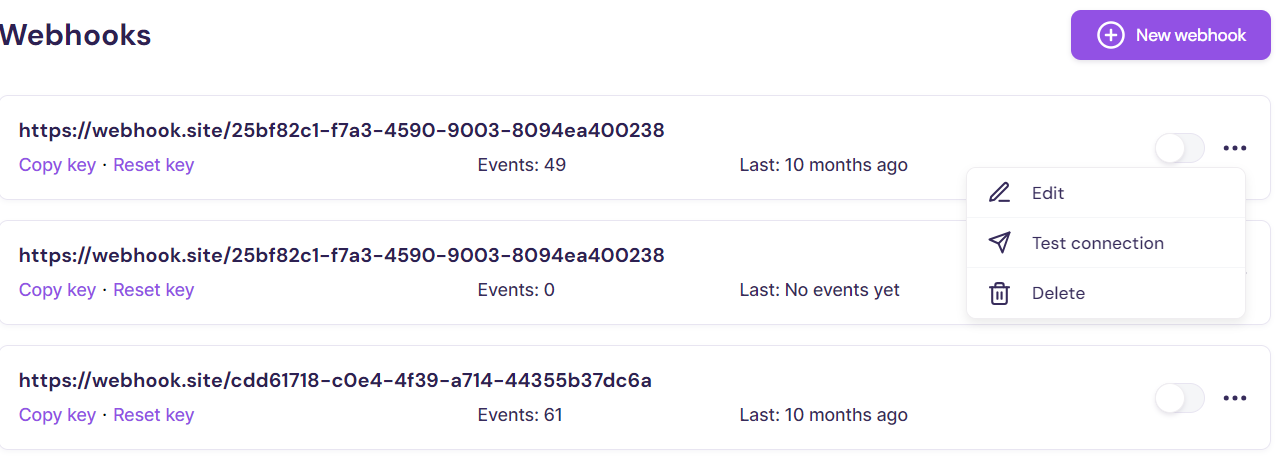
Navigate to Settings > Webhooks and open the three-dot menu.
-
Click Edit to update the webhook configuration.
-
Click Test connection to re-test the endpoint.
-
Click Delete to remove the webhook.
Reset Key
Reset the signing key if you suspect the current key has been compromised or if you are rotating secrets as part of your security process.
- Navigate to Settings > Webhooks.
- Click Reset key.
- Walnut generates a new key for signing webhook requests.
- Update your receiving endpoint to use the new key immediately.
Disable a Webhook
- Navigate to Settings > Webhooks.
- Set the webhook toggle to Off.